MBWBLUE
A portable Wireless M-Bus 868 MHz receiver with Bluetooth. It captures meter messages and passes them to the app.
MBWBLUE – pricing and ordersVodoměry Praha shop in Czech

Your meter list, current readings and alarms on an Android phone. Connect an MBWBLUE receiver to read SSM AQUO water meters over Wireless M-Bus.
Download VODAPP, import your table and connect an MBWBLUE receiver.
Download VODAPP 0.15.0Android installation file · APKIn the app, open Settings → Offline maps, choose Czechia, Germany or Italy, and download the selected map from the public Mapsforge mirror. A downloaded map works without internet. A previously saved Czech map remains usable until the new variant is downloaded.
VODAPP and the MBWBLUE receiver provide a portable solution for walk-by or drive-by reading of SSM AQUO water meters. The operator has the meter list and results together on their phone.
Import a table of serial numbers. Add the corresponding W-MBus keys for encrypted messages.
The receiver captures radio messages and sends them to the app over Bluetooth. VODAPP uses T1/C1 at 868 MHz.
See completed and remaining readings, supported alarms and historical values. Save the results to XLSX or CSV.

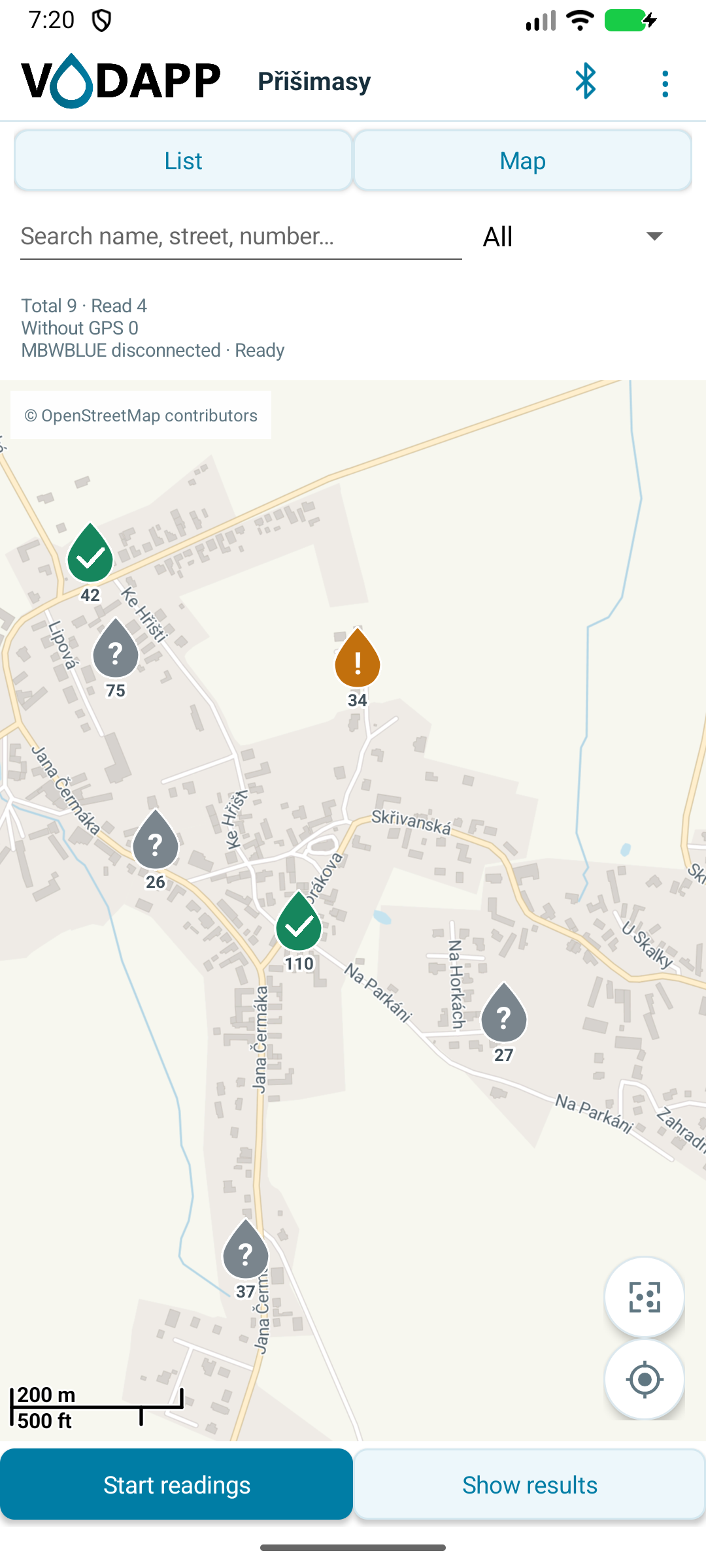

Current VODAPP – example data.
An Android 10 or newer phone or tablet, an MBWBLUE receiver and a VODAPP licence. The receiver and licence are sold separately.
A portable Wireless M-Bus 868 MHz receiver with Bluetooth. It captures meter messages and passes them to the app.
MBWBLUE – pricing and ordersVodoměry Praha shop in CzechA permanent VODAPP licence for one phone. Try the app for 15 days before purchasing.
VODAPP – licence and ordersVodoměry Praha shop in CzechIn VODAPP, open Licence and device and copy the six-character device ID. Email it to us with your company name and billing details. We will email your licence with a QR code. Scan the QR or open the licence file in the app to activate it.
The licence is for one device. Once activated, it also works offline.
koller@vodomerypraha.cz Licence and device
Device ID · 6 characters
7K4M9RVODAPP decodes supported SSM AQUO water meter telegrams. The meter must be transmitting Wireless M-Bus T1/C1 at 868 MHz. Encrypted messages require the correct key. We can assess support for other water, gas and heat meter models based on the model and the data you need.
No. The phone receives and saves readings without an internet connection. Internet access is needed to download the app and updates or to email results.
The system is intended for building managers, homeowners’ associations, water utilities and meter-reading companies that want to carry out their own mobile readings. The shop sells meters, receivers and app licences. We recommend confirming support for your meter models before purchase.
No. Install the APK directly; the licence is tied to the device. Meter reading works offline. Internet access is needed to download updates and email results.
Open Updates in the VODAPP menu. The app verifies the release on this website and offers a newer version for installation. Confirm installation in Android. Do not uninstall VODAPP before updating.
Source tables belong in Documents/VODAPP/import; results go to Documents/VODAPP/export. Readings in progress and encrypted keys stay on the phone. Source files in import remain unchanged. This website does not receive meter lists or their encryption keys.
A new phone has a new ID. Contact us to transfer your licence. A normal VODAPP update preserves the device ID.